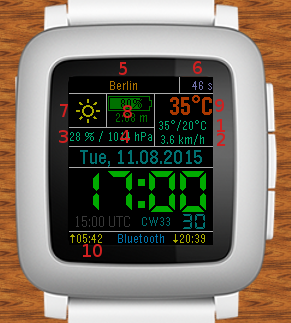
OWM API KEY: [5]:
(You can register on www.openweathermap.org, otherwise a default key will be used. There is no benefit to using your own key at the moment.)
Default Location [5]:
(refer to www.openweathermap.org, e. g. London, Berlin, ...)
Autodetect Location:
OWM Language String (e. g.: en (default), de, fr, uk, ru, ...)
Show Update Time [6]:
Moon Phase: [7]:
Additional weather info
Info 1 [1]:
Info 2 [2]:
Info 3 [3]:
Info 4 [4]:
Weather units
Temperature unit:
Speed unit:
Pressure unit:
Weather update interval
Select color scheme:
On old pebble watches (Aplite platform), colored selection will fallback to white on black.
On Diorite (Pebble 2), some color profiles look crappy, but some use gray scale. Please test this out by yourself.
Colored Temperature (only watches with colored display):
Background Light:
Display seconds:
Date Format:
Time Zone Info:
Health Info of today (instead of Time Zone Info):
Vibrate on Bluetooth disconnect (longer 3 pulses) and connect (2x short-long, 4 pulses):
Vibrate on Hour (double pulse):
Annotation:
[7]: Weather condition icon (data from openweathermap). At night, the moon phase is shown (calc. in watchface).
[8]: Battery information. The time under the battery indicates the runtime since unplugged, or if plugged the time from plugging in until battery was full.
[9]: Actual temperature (data from openweathermap). The color changes for different temperatures.
[10]: Sun rise and sun set (data from openweathermap)
[11]: Calendar Week (english: CW, deutsch: KW, français: S.)
Donation:
Development and maintenance of this watchface costs much time and also some money. If you like this watchface, please consider donating a small amount. Please do NOT donate if you expect a new feature to be implemented and to push it. I have very limited time now for changing this watchface. The source code is available at http://github.com/cfg1. Please consider if changes can be made by your own. Maybe you like to have something a little bit different?
If you still want to donate, here is the PayPal button to do so: